PacTap – Procurement Management System

Designed By

Akshat Khare

Timeline

2 weeks

Read In

7 mins

Procurement Managers in FMCG companies juggle multiple vendor quotations manually — think Excel chaos, back-and-forth calls, and endless email threads. For Pactap, the goal was simple: streamline quotation management for Mono-Carton packaging and help their Procurement Manager take faster, more accurate decisions — minus the mess.

Tumzey is a revolutionary food ordering platform that has greatly simplified the process of ordering food and dining out. Our user-friendly interface and extensive range of options are designed to make your dining experience more enjoyable and memorable. Whether you’re looking for a quick bite to eat or a romantic evening with your significant other, Tumzey has got you covered.


We work with hundreds of restaurants to bring you the best food and dining options available. From gourmet cuisine to everyday favorites, we’ve got it all. With Tumzey, eating out has never been easier or tastier! Enjoy the best food and dining experience of your life!

Roles

Problem Scoping
Information Architecture
Logo Designing
UI/UX Designing
Visual Designing

Project Background

In the fast-paced world of FMCG, timely and efficient procurement plays a crucial role in maintaining product availability and cost efficiency. The company faced delays and inconsistencies in managing quotations for Mono-Carton packaging due to a manual, scattered process. This project aimed to solve that by designing a centralized procurement system specifically for the Procurement Manager, focusing on faster and smarter decision-making.

Understanding the Problem

Through quick UX research, including heuristic evaluation and desk research, I learned that the PM’s daily challenges weren’t about a lack of tools — it was about a lack of clarity, structure, and control.

Key pain points included:

  • Managing dozens of quotations from different vendors

  • Manually comparing line items like unit price and lead time

  • Losing time tracking changes or missed responses

  • Making decisions without a single source of truth

The objective became clear: design an intuitive procurement management system that reduces decision time, simplifies vendor comparison, and builds trust through clarity.

Understanding the User

Primary User : Procurement Manager (PM)

Key Responsibilities:

  1. Requesting quotations for packaging materials

  1. Evaluating vendor quotes based on cost and delivery timelines

  1. Finalizing orders and ensuring timely procurement

Key Responsibilities:

  1. Requesting quotations for packaging materials

  1. Evaluating vendor quotes based on cost and delivery timelines

  1. Finalizing orders and ensuring timely procurement

Pain Points:

  1. Manually collecting and managing multiple quotations

  1. Difficulty in comparing quotes with inconsistent formats

  1. Prone to human errors and delays

Pain Points:

  1. Manually collecting and managing multiple quotations

  1. Difficulty in comparing quotes with inconsistent formats

  1. Prone to human errors and delays

User Goals:

  1. A single dashboard to manage all quotations

  1. Quick and clear comparisons of price, quantity, and lead times

  1. Easy finalization of orders

User Goals:

  1. A single dashboard to manage all quotations

  1. Quick and clear comparisons of price, quantity, and lead times

  1. Easy finalization of orders

Designing with Purpose

To create this solution, I defined three guiding principles:

  1. Centralized Control – Bring all quotations into one consistent view.

  2. Actionable Clarity – Let comparisons speak through clear design and visual cues.

  3. Flexible Finalization – Support the PM’s decision-making, not dictate it.

This informed the creation of four core modules:
Quotations → Quotation List → Comparison → Order Finalization

Each of these screens was carefully designed to serve a distinct purpose — all while connecting seamlessly in the larger workflow.

What Users Really Wanted

Here’s what the Procurement Manager was looking for:

Quotation Management: A simple way to add, view, and manage multiple quotes

Comparison Matrix: Side-by-side view with sortable parameters (price, lead time, etc.)

Finalization Flow: Flexibility to either add a quote to cart or confirm it right away

Smart Highlights: Auto-highlight best quote based on preset logic

Clean UI: Easy-to-scan layout with minimal clutter

Data Visualization: Quick graphs or summaries to help spot the best deal faster

Here’s what the Procurement Manager was looking for:

Quotation Management: A simple way to add, view, and manage multiple quotes

Comparison Matrix: Side-by-side view with sortable parameters (price, lead time, etc.)

Finalization Flow: Flexibility to either add a quote to cart or confirm it right away

Smart Highlights: Auto-highlight best quote based on preset logic

Clean UI: Easy-to-scan layout with minimal clutter

Data Visualization: Quick graphs or summaries to help spot the best deal faster

Screen-by-Screen: Solving One Step at a Time

A closer look at how each screen is designed to simplify the procurement process.
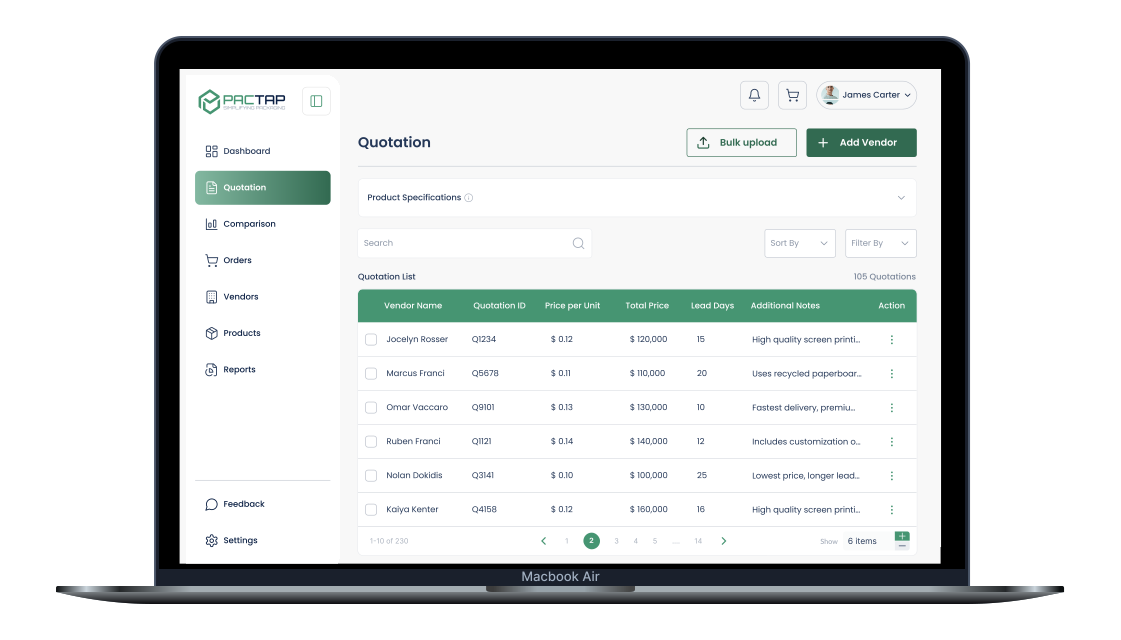
Quotations: Gathering the Options

What’s happening:
This is the starting point where the Procurement Manager (PM) sees all the quotations received from different vendors.


What the PM can do here:

  • View product details like quantity, size, and material.

  • See vendor info along with unit price, total cost, and delivery time.

  • Select the quotes they want to compare by ticking checkboxes.

  • Once at least two are selected, the “Compare” button becomes active.


Goal:
Help the PM quickly scan through options and pick the ones they want to look at more closely.

Quotations: Gathering the Options

What’s happening:
This is the starting point where the Procurement Manager (PM) sees all the quotations received from different vendors.


What the PM can do here:

  • View product details like quantity, size, and material.

  • See vendor info along with unit price, total cost, and delivery time.

  • Select the quotes they want to compare by ticking checkboxes.

  • Once at least two are selected, the “Compare” button becomes active.


Goal:
Help the PM quickly scan through options and pick the ones they want to look at more closely.

Comparison Matrix: Deciding with Confidence

What’s happening:
Here, the selected quotations are compared side-by-side.


What the PM can do here:

  • View a side-by-side table of vendor price, total cost, delivery time, and rating.

  • Best quote is auto-highlighted based on price and lead time.

  • Easily go back to add or remove vendors from the list.

  • Proceed by adding the preferred quote to the cart.


Goal:
Make it super easy for the PM to spot the best deal without confusion.

Comparison Matrix: Deciding with Confidence

What’s happening:
Here, the selected quotations are compared side-by-side.


What the PM can do here:

  • View a side-by-side table of vendor price, total cost, delivery time, and rating.

  • Best quote is auto-highlighted based on price and lead time.

  • Easily go back to add or remove vendors from the list.

  • Proceed by adding the preferred quote to the cart.


Goal:
Make it super easy for the PM to spot the best deal without confusion.

Order Details: Finalizing with Flexibility

What’s happening:
This is where the PM finalizes their decision.


What the PM can do here:

  • See full details of the selected quotation: vendor name, pricing, and delivery time.

  • View an order summary, including product specs and total cost.

  • Choose to either “Add to Cart” or “Confirm Order” right away.

  • Go back if they want to review or compare again.


Goal:
Ensure the PM is confident before placing the order — everything is double-checked and clear.

Order Details: Finalizing with Flexibility

What’s happening:
This is where the PM finalizes their decision.


What the PM can do here:

  • See full details of the selected quotation: vendor name, pricing, and delivery time.

  • View an order summary, including product specs and total cost.

  • Choose to either “Add to Cart” or “Confirm Order” right away.

  • Go back if they want to review or compare again.


Goal:
Ensure the PM is confident before placing the order — everything is double-checked and clear.

Final Outcomes & Impact

By the end of the project, the procurement system:


  • Reduced the average decision-making time by 60%

  • Eliminated manual errors by standardizing comparison logic

  • Empowered Procurement Managers with visual insights and fast actions

  • Created a calm, focused interface aligned with user preferences

Reflection

This project reminded me that design isn’t always about reinventing workflows — sometimes it’s about removing friction from the tools people already trust. By focusing on what matters most to the user (clarity, structure, control), we created not just a system — but a sense of relief.

From Pixels to Perfection,
Other Projects

Tumzey

A seamless food experience app designed to reduce order time…

Medsuite

In a sector where lives depend on precision and efficiency, even the sm…

IRCTC

Install the Figma plugin and you’re ready to convert your designs to…

Create a free website with Framer, the website builder loved by startups, designers and agencies.